MementoFlow — Moments, beautifully delivered.Request a demo

Built for professional event teams

From event photograph to lasting keepsake, all in one flow.

MementoFlow connects capture, customer selection, ordering and printing—so your team can stay present while the event keeps moving.

  • ✓ Keep shooting offline
  • ✓ Choose together
  • ✓ Pick up where you left off
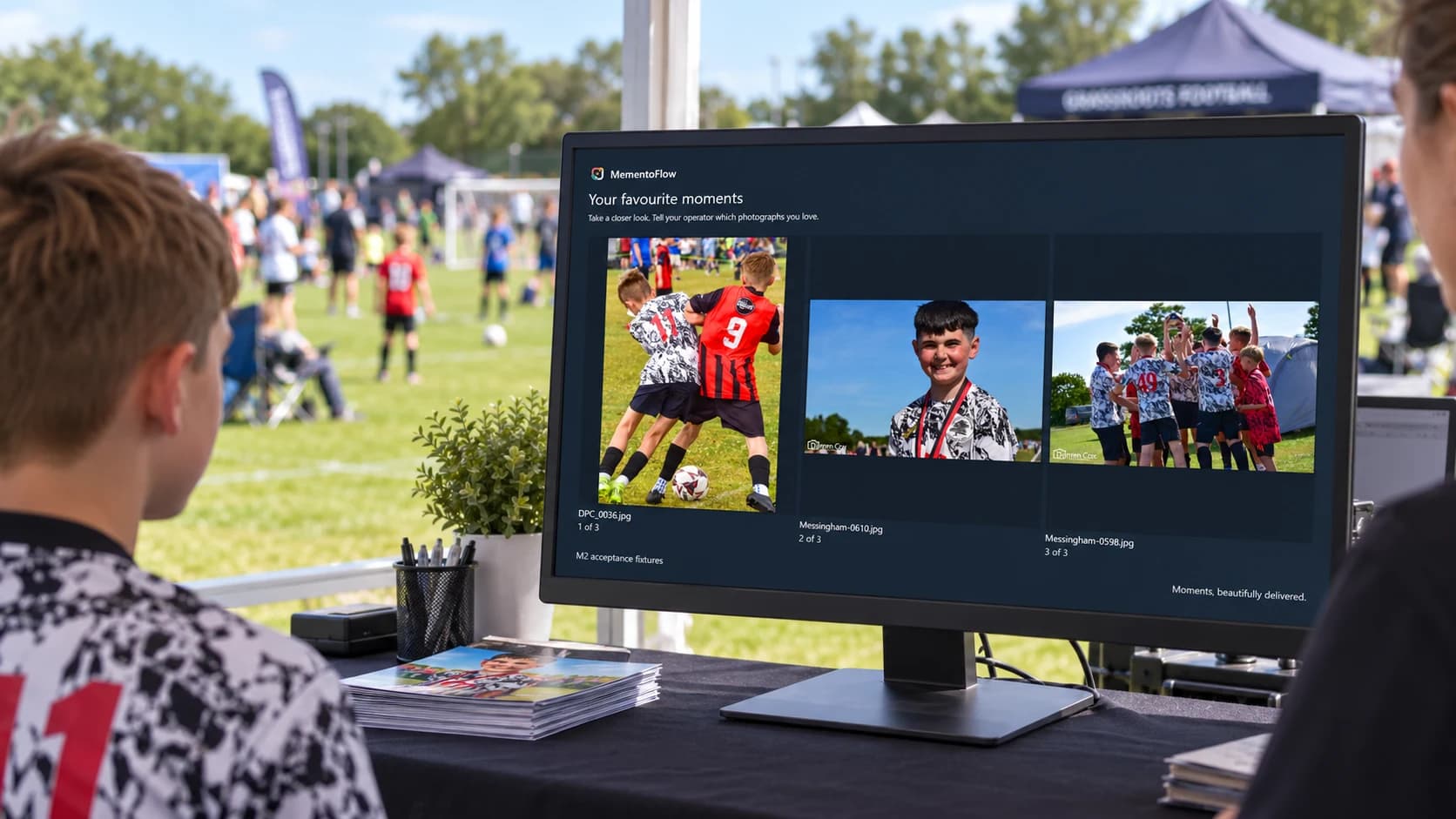
A customer reviewing football photographs on the MementoFlow display at an outdoor tournament sales desk

Less juggling.
More moments delivered.

Event sales rarely happen in calm conditions. Photographs arrive quickly, customers are waiting and every choice must reach the right product and printer.

MementoFlow brings those moving parts into one deliberate workflow, giving photographers and event organisers a clearer path from capture to keepsake.

Keep shooting.
Keep every moment moving.

Connect your camera, choose the album and keep shooting. Capture Station takes care of moving each photograph safely into MementoFlow, so the photographer can stay focused on the event.

Compact stationUSB-connected cameraJPEG photographs
  1. 01
    Connect, then choose an album

    Register the station with your server using its setup QR. Then scan an album QR to start a photo session with every new photograph going to the right place.

  2. 02
    Shoot as normal

    Keep using the camera shutter as you always do. Photographs arrive in Capture Station automatically, while the originals stay safely on the camera card.

  3. 03
    Keep every photograph safe

    Capture Station checks and saves each photograph before sending it on. The touchscreen gives your team a clear view of the photo count, camera and delivery progress.

  4. 04
    Stay moving

    If the event network drops out, keep shooting. Capture Station sends the photographs when the connection returns. You can also bring several finished sessions into a Sales Client by USB, with each transfer checked before it is marked complete.

Capture Station works with compatible USB-connected cameras and currently handles JPEG photographs. As part of your setup, we’ll test your exact camera, displays and printers before event use. Offline capture requires an active licence and available storage.

Designed around the sale, not around the software.

Start with a smooth event-day setup, then add online tools when you want to keep the connection going beyond the sales desk.

A great event day, with or without venue internet.

Capture, choose, order and print over your own local network. No public internet connection is needed for the core workflow.

01

Keep every photograph organised

Arrange each event into folders and albums that suit your programme, or bring in your event schedule from a CSV spreadsheet. Add photographs from Capture Station or a camera card and find the right moments quickly.

Flexible event folders · Card imports · Contact sheets
02

Choose favourites together

Build a shortlist across event albums and give customers their own clear view. Need to pause a longer selection? Save a draft and return to the same favourites and product choices later.

Quick browsing · Customer display · Saved drafts
03

Bring each order to life

Turn favourite photographs into prints, bundles, sheets and framed products, with simple adjustments to make every choice look its best.

Flexible products · Simple adjustments · Clear previews
04

Print with confidence

Keep useful printer settings ready for the next order, print from the original photographs and check each finished item. If work is interrupted, your team can see what happened before trying again.

Remembered printer settings · Easy recovery · Order history
05

Make the price easy to see

Give customers a clear GBP total as they choose their products. Keep your prices and VAT settings together on the event server, so every sales desk works from the same figures.

Clear customer totals · Shared prices · VAT settings
06

Hand over a helpful receipt

Print an 80 mm receipt with the order details, photo thumbnails and filenames. Add a collection reference so customers and your team know what they’re picking up.

Thermal receipts · Photo references · Collection notes
07

Take capture around the venue

Alongside Capture Station, MementoFlow Capture for iPhone can save new JPEGs from a compatible connected camera and send them to the chosen album. Saved photos wait safely when the server is out of reach.

iPhone capture · Shoot schedules · Reviewed recovery
08

Keep the library tidy

Give your team the right access, move a misplaced photograph into its proper album and tuck finished events away without losing their history. The event lead stays in control from one place.

Team accounts · Album management · Event archive

Your server and Sales Clients still need a local network and an active licence. Capture devices can hold saved photographs while disconnected; sign-in and new album choices need the server. We’ll check cameras, iPhone setup, displays and printers with you before event use. Capture Client licences and hardware are separate.

Keep the connection going.

Online Connect brings the internet-powered features together in one add-on: galleries, online ordering, digital delivery and email receipts.

01

Let the gallery travel home

Publish event galleries with watermarked previews, so customers can enjoy another look after the event. Share an album link or QR code to help them find their photographs.

Online galleries · Watermarked previews · Album links
02

Keep online orders in the flow

Offer your chosen products online, with collection or delivery options. Bring paid orders back to the event team with the purchased details intact, ready to pick up and print without starting again.

Online ordering · Collection and postage · Order retrieval
03

Offer a digital keepsake

Add digital photographs to a counter or online order. Purchased originals are queued for secure transfer to the online service, while your team carries on with the physical prints.

Digital products · Queued transfers · Mixed orders
04

Send the details by email

Give customers the option of an emailed receipt, with their order and collection details together. Requests wait in a queue if the internet drops, ready for the configured email service to send them later.

Email receipts · Shared collection references · Delivery status

Online features need an internet connection, compatible software and a configured hosted portal. Digital delivery and email receipts also depend on their delivery services. Some integrations still need coordinated deployment and live checks, so we’ll agree availability and setup before you order. A queued request is not confirmation that an email or download has reached the customer.

A clear path through a busy event.

From the first photograph to the finished product, every step stays connected and easy to follow.

  1. 01

    Capture

    Scan an album QR, start shooting and let Capture Station take care of the rest.

  2. 02

    Curate

    Find the moments your customer loves and keep their favourites together.

  3. 03

    Sell

    Turn those favourites into products and review every choice together.

  4. 04

    Deliver

    Print with confidence and make sure every order is ready to take home.

Built for the pressure behind the picture.

Customer favourites stay organised, confirmed orders stay on track and interrupted work is ready when your team returns.

  • 01 Move between event albums without losing the customer’s favourites
  • 02 Let customers review their chosen products on their own display
  • 03 Check an interrupted print job before anything is printed again

Choose the capacity and time your event needs.

Choose how many Sales Clients your team needs, how long the licence should run and the number of Capture Clients you want to connect. Each Sales Client band includes room to grow up to the stated limit.

Discuss your setup

All prices exclude VATVAT is added to licence terms, Capture Clients and Online Connect charges.

Licence prices by term and Sales Client capacity, with Capture Client and Online Connect options. All prices exclude VAT.
Licence term1–4 requested4-client licence5–8 requested8-client licence9–20 requested20-client licence
1 month£15.00excluding VAT£40.00excluding VAT£90.00excluding VAT
3 months£45.00excluding VAT£120.00excluding VAT£270.00excluding VAT
6 months£85.50excluding VAT£228.00excluding VAT£513.00excluding VAT
12 months£162.00excluding VAT£432.00excluding VAT£972.00excluding VAT
Capture Clientone-off per station£30.00 per Capture Clientone-off charge, excluding VAT
Online Connectper month · online features bundle£15.00per month, excluding VAT£40.00per month, excluding VAT£90.00per month, excluding VAT

Add Capture ClientsEach Capture Client is a one-off £30 software charge, not a monthly charge. Two add £60 excluding VAT. Capture Station capacity is separate from Sales Client capacity and operates under your server’s active licence. Hardware is not included.

Add Online ConnectOne add-on bundles the internet-powered features for your full licence term. A 6-month licence for up to 4 Sales Clients with Online Connect is £175.50 excluding VAT (£85.50 + 6 × £15). Hosted-portal and delivery-service setup and checks are required; discuss availability with us first.

Room for your teamYour band allows up to 4, 8 or 20 Sales Clients connected at the same time, on one licensed server. Choose a fixed term of 1, 3, 6 or 12 months, with no automatic renewal.

What event teams ask us.

Have a different setup in mind? Tell us about it in your demo request.

Who is MementoFlow for?

MementoFlow is designed for professional event photographers and event teams who select, sell and produce photographs while an event is still in progress.

Does it need an internet connection at the venue?

The core event workflow does not. Your Sales Clients connect to your own event server over a local network, so browsing, orders, photo printing and thermal receipts can keep moving without venue internet. Online Connect features need internet access; queued digital transfers and email requests wait until their services are reachable.

How does the Capture Station bring photographs into MementoFlow?

Connect a compatible camera to the Capture Station, scan the album QR and carry on shooting as normal. Each photograph is saved safely and sent to MementoFlow automatically. If the event network drops out, the station keeps working and sends the photographs when the connection returns. You can also move completed sessions by USB when needed. We’ll confirm your camera is compatible as part of your setup.

Can customers choose photographs themselves?

At the event, your team guides the selection while customers review favourites, products and totals on their own display. With Online Connect and a configured hosted gallery, customers can also browse and order online.

Which products can it support?

Build a catalogue around the products you already sell, including standard prints, multi-print bundles, sheet layouts and framed products. Your team works from the same approved product choices at every Sales Client.

What happens if a connection or print job is interrupted?

Your work is saved, so you can pick up where you left off. MementoFlow also asks your team to check an interrupted print job before anything is printed again, helping to prevent missed or duplicate orders.

How is a licence priced?

Choose how many Sales Clients you need and a term of 1, 3, 6 or 12 months. Capture Clients are £30 each as a one-off charge, and optional Online Connect is charged monthly for the same licence term. The online add-on is £15, £40 or £90 per month for the 4-, 8- or 20-client band. All prices shown exclude VAT.

What equipment will we need?

The Application Server and Sales Clients run on Windows 11 PCs connected to your local event network. Capture Station runs on a 64-bit Raspberry Pi with a compatible USB-connected camera. A second display lets customers review their choices. Bring your preferred cameras, printers and product sizes to the demo discussion so we can agree and test a suitable setup. Hardware is not included in the software licence prices.

Does MementoFlow take payments at the event?

MementoFlow shows your product prices, GBP totals and VAT, and can print customer receipts. Keep using your chosen till or payment service for taking counter payments; the Sales Client does not process card payments. Online checkout depends on the configured hosted portal and its payment service.

How do we get started after a demo?

Build your licence request, then we review it and issue an invoice from Pipe IT Consultancy Limited. Once payment is recorded, download the software from the customer portal, install the Application Server and use its Server ID to generate your licence key. The portal includes a getting-started guide for installing the key and connecting your Sales and Capture Clients.

What is Online Connect?

Online Connect is the new name for the Online Gallery add-on. It bundles the internet-powered features: gallery publishing, online orders, collection and delivery options, digital-photo delivery and email receipts. A compatible hosted portal and delivery services must be configured and checked first. Ask us about availability and setup; the add-on is not an automatically provisioned website or a promise of instant delivery.

Let’s talk about your event workflow.

Tell us what you photograph, how your event team works and what you produce. We’ll shape the demo around the moments that matter to you.

Prefer email?info@pipeitc.uk